
“12 Scams of Christmas” Targeting Cincinnati and Northern Kentucky Businesses
Every holiday season, Cincinnati-area small businesses hear the same advice: Watch out for phishing emails. Don’t click suspicious links. Be careful.
And every holiday season, local businesses still get hit — manufacturers, professional services firms, nonprofits, and family‑owned companies alike. Not because they weren’t warned, but because the scams have changed and most defenses haven’t kept pace
. Which means, if you’re still looking for bad grammar, obvious fake emails, or sketchy links, you’re already behind.
Here’s what’s actually putting Cincinnati and Northern Kentucky businesses at risk this holiday season — and what actually helps.
TL;DR – Read this before you take PTO!
If you only read one section, read this before you take PTO:
- Holiday scams aren’t obvious anymore — they’re designed to look routine and internal.
- Most incidents don’t start with hackers. They start with normal employees trying to move fast.
- AI has eliminated the grammar and tone red flags that people still rely on.
- The biggest risks come from payment changes, data requests, and internal impersonation.
- “Be careful” doesn’t stop attacks — clear verification rules and monitoring do.
If you’re closing for the holidays without knowing how to catch these scenarios, that’s where the real risk lies.
What’s Different This Year (And Why It Matters)
Holiday scams didn’t get louder. They got more believable.
Attackers are no longer trying to trick people who don’t know better. They’re exploiting:
- Trust between coworkers
- Rushed decisions
- Broken or unclear processes
- The assumption that “we’d notice if something was wrong”
AI has removed most of the obvious red flags. And attackers are targeting how work gets done, not just inboxes. That’s why the same companies that felt “pretty secure” last year are still getting burned.
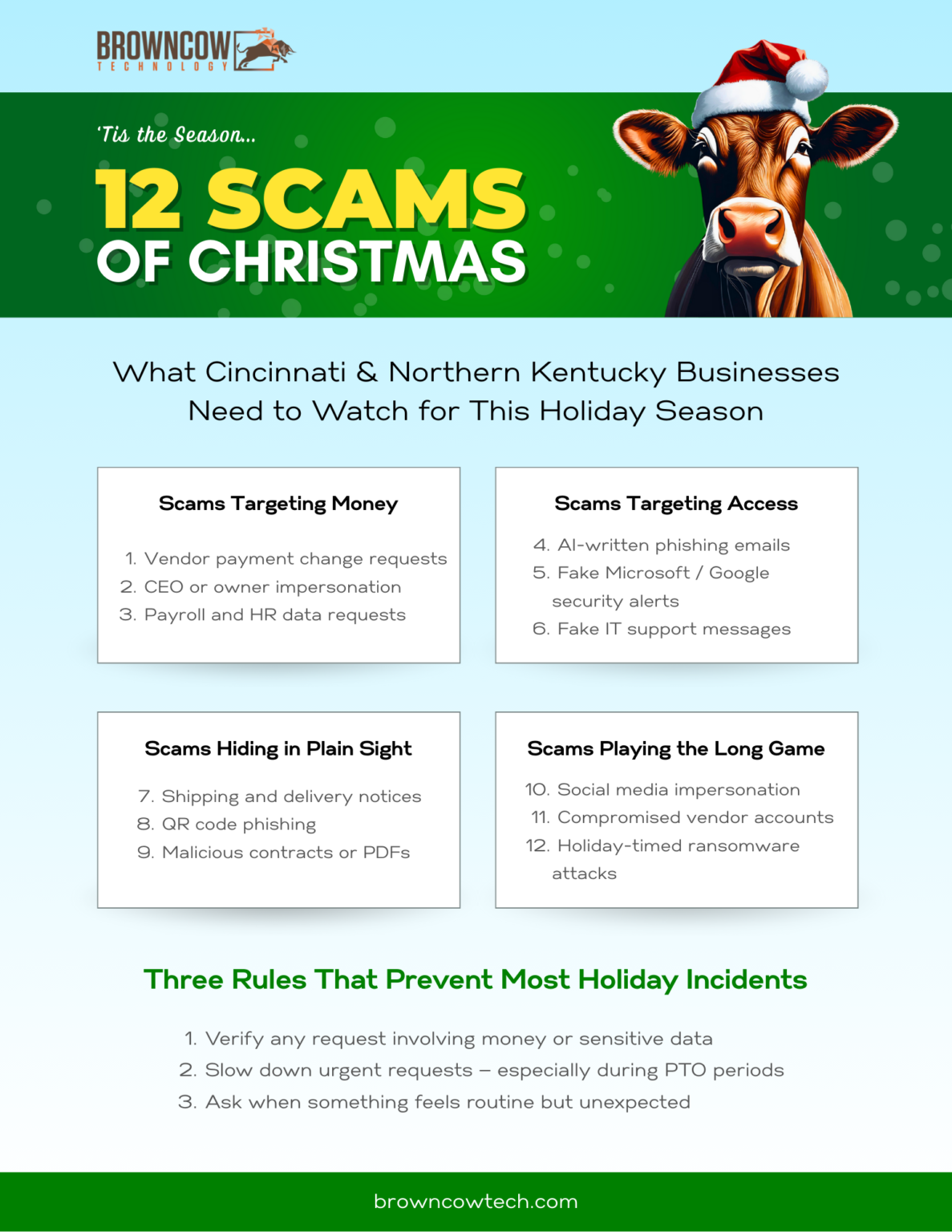
*Download the PDF Here
The 12 Holiday Scams Actually Hitting Businesses Right Now
For Cincinnati-area businesses, risk is amplified by the local market’s interconnectedness. Many SMBs rely on the same payroll providers, local banks, regional vendors, and professional services firms. That familiarity builds trust — and attackers exploit it by mimicking names, processes, and communication styles that already feel legitimate.
The common thread across these scams isn’t technical sophistication. It’s timing, trust, and gaps in process. When work speeds up and teams thin out for the holidays, those gaps widen.
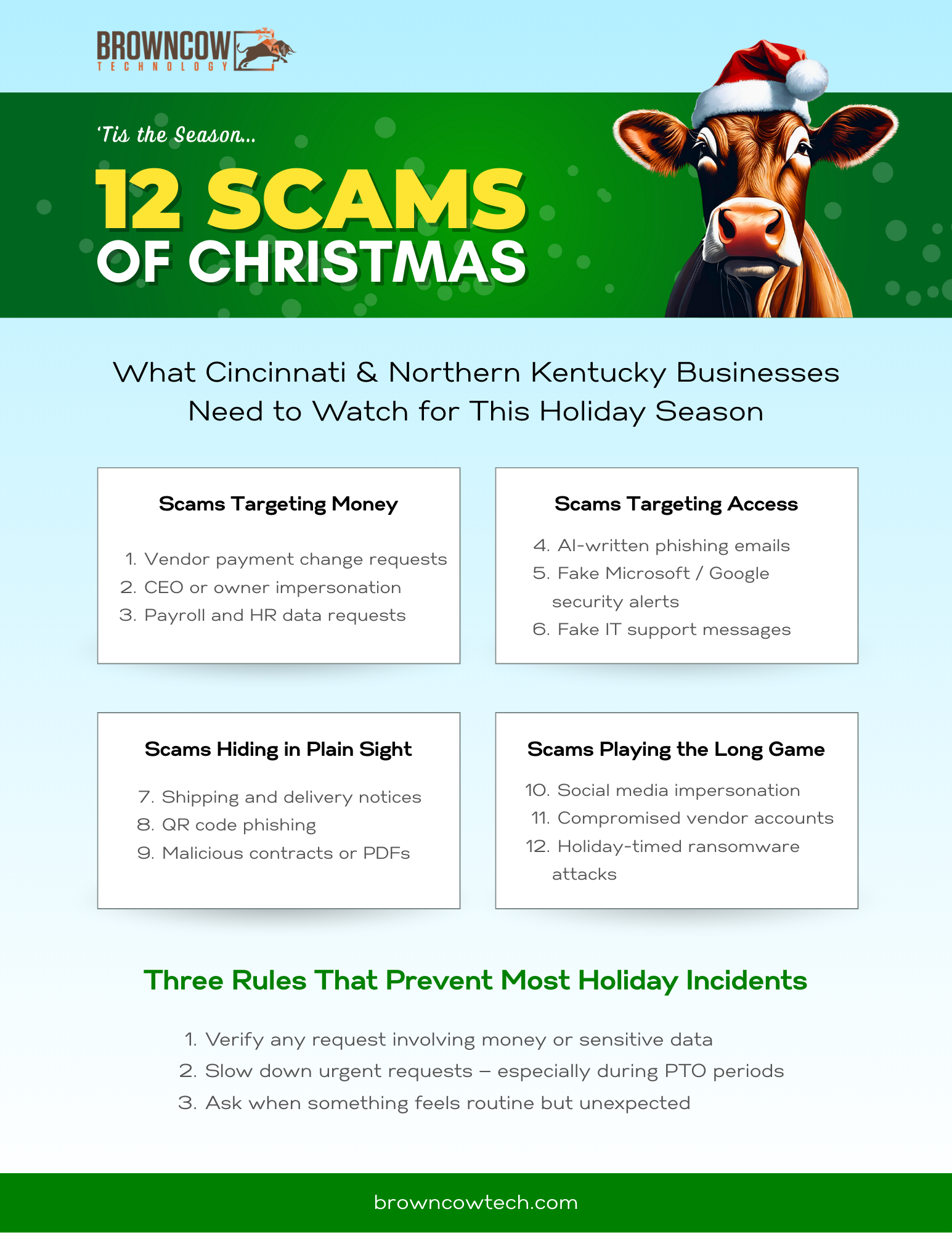
These 12 scams fall into four clear patterns. Seeing them this way makes it easier to spot risk early — before a routine request turns into a costly mistake.
“Attackers don’t need new tricks. They just need busy people.”
Scams Targeting Money
1. Vendor Payment Change Requests
Messages claiming updated banking details or payment instructions are still one of the most costly scams for small businesses.
They succeed because they exploit end-of-year pressure: finance teams are closing books, vendors are rushing invoices, and verification steps quietly get skipped to keep things moving. Without a strict, documented verification process, it only takes one approval to send money to the wrong place.
2. CEO or Owner Impersonation
These scams haven’t gone away — they’ve become more believable.
In many cases, the message now comes from a compromised internal account rather than an external address. That makes employees far less likely to question requests involving gift cards, payments, or sensitive information, especially when they appear to come from leadership.
3. Payroll and HR Data Requests
Requests for W-2 information, direct deposit changes, or employee data spike at year-end.
These messages are effective because payroll and HR responsibilities are often centralized with one person and backed by tight deadlines. Without secondary approval or verification, attackers can quietly redirect paychecks or collect highly sensitive data.
Scams Targeting Access
4. AI-Written Phishing Emails That Look Legit
These emails are well-written, calm, and often reference real vendors, internal projects, or tools your business actually uses.
What makes them dangerous is how routine they feel. They’re designed to bypass instinct and blend into the hundreds of legitimate emails employees handle every week. If your defense depends on someone noticing something “feels off,” this type of phishing slips right through.
5. Fake Microsoft or Google Security Alerts
These emails look like legitimate administrative warnings — not pop-ups or obvious scams.
Their goal is simple: harvest credentials. Once attackers gain access to an email account, they can move laterally, impersonate internal users, and monitor conversations before making a move.
6. Fake IT Support Messages
Messages claiming suspicious activity or required verification prey on uncertainty.
They’re especially effective in businesses without dedicated internal IT or where employees aren’t sure what legitimate security alerts look like. Confusion becomes the entry point.
Scams Hiding in Plain Sight
7. Shipping and Delivery Notices
Holiday shipping volume gives attackers cover. These messages often arrive outside normal work hours and target both personal and business inboxes.
A single click can compromise browser sessions, expose saved credentials, or create access that attackers later use for internal impersonation. The initial email is rarely the end goal — it’s the entry point.
8. QR Code Phishing
QR codes appear on shipping notices, menus, event signage, and promotional materials.
They remove a key safety check — seeing where a link leads before clicking. Once scanned, users are redirected instantly to credential-harvesting pages with little chance to stop and reassess.
9. Malicious Contracts and Document Attachments
Attackers frequently disguise malicious files as updated contracts or signed documents using trusted branding like DocuSign or Adobe.
The intent isn’t always malware. Often, it’s credential capture or gaining access that can be exploited later, when defenses are down.
Scams Playing the Long Game
10. Social Media Impersonation
Fake LinkedIn profiles build trust slowly, sometimes over weeks or months.
By the time a request is made, the relationship feels established. These scams succeed because they don’t feel like scams — they feel like networking.
11. Compromised Vendor Accounts
Instead of spoofing vendors, attackers increasingly log in as them.
Invoices and requests sent from legitimate vendor accounts bypass spam filters and skepticism entirely. This type of compromise highlights a hard truth: your security exposure includes your vendors’ security posture as well.
12. Holiday-Timed Ransomware Attacks
Attackers deliberately strike when response times are slow.
During holidays, monitoring is lighter, leadership may be unavailable, and pressure to restore systems quickly is high. Ransom demands are calculated around that reality.
Why “Be Careful” Still Fails
Most holiday incidents don’t happen because people are careless.
They happen because:
- There’s no clear rule for verifying money or data changes
- One person has too much authority
- Alerts get missed or ignored
- Everyone assumes someone else would catch it
Security breaks down quietly — not dramatically.
What Actually Reduces Risk (Without Killing Productivity)
This isn’t about paranoia. It’s about removing single points of failure.
What helps:
- Multi-factor authentication everywhere (especially email and admin accounts)
- Clear approval processes for payments, payroll, and data requests
- Verification rules that don’t get bypassed “because it’s urgent”
- Monitoring that flags unusual behavior early
- A defined holiday coverage plan so nothing goes unseen
What doesn’t:
- One-time training
- Annual reminder emails
- Hoping someone asks before clicking
Quick Reality Check Before You Close for the Holidays
Ask yourself honestly:
- Would a fake payment change request get verified — every time?
- Could someone impersonate leadership internally without being challenged?
- Would anyone notice abnormal email activity over a long weekend?
- Do employees know what real IT or security alerts look like?
If those answers aren’t clear, that’s the risk.
“Most holiday breaches don’t happen because defenses failed — they happen because processes were never defined.”
One Last Thought
Most of the holiday incidents we see aren’t caused by advanced hacking. They’re caused by normal people trying to move fast — without safety rails.
Closing that gap is the difference between a quiet holiday and a very expensive one. If you want a second set of eyes on where your business is actually exposed before year-end, that conversation is worth having — before attackers do.
Related Resources to Protect Your Business During the Holidays
- FTC Holiday Scam Alerts
Stay updated on the latest scams targeting businesses and consumers. The Federal Trade Commission provides comprehensive guides to recognizing and avoiding holiday-season scams. - Cybersecurity and Infrastructure Security Agency (CISA)
Learn about actionable steps to enhance your business’s cybersecurity defenses, with a focus on seasonal risks. - Charity Navigator: Verify Charitable Organizations
Before making donations or supporting causes, check the legitimacy of charities with this trusted resource. - NCSA – Safe Online Holiday Shopping
The National Cybersecurity Alliance provides tips for businesses and employees to stay secure while shopping and working online. - Cybersecurity Insights for Small Businesses
Explore actionable tips, updates, and strategies to protect your small business from cyber threats year-round. - Better Business Bureau (BBB) Scam Tracker
Report scams or see the latest fraud trends impacting businesses and consumers in your area. - IRS Tax Scams and Consumer Alerts
Avoid end-of-year tax scams with this authoritative guide from the IRS. - PCI Security Standards Council
Learn how to secure your payment systems and protect customer payment data during the holiday rush. - Krebs on Security: E-Skimming Threats
A leading source for understanding e-skimming and other advanced cybersecurity threats affecting businesses. - National Institute of Standards and Technology (NIST) Cybersecurity Framework
Build a robust cybersecurity framework for your business with trusted guidance from NIST.

PROTECTING OUR HERD FROM CYBER THREATS
Medical & Dental
Property Management
Small Manufacturing
Professional Services